
SFM compile is a term that can mean different things depending on what a Source Filmmaker user is trying to accomplish. In the technical sense, it refers to preparing and converting 3D assets so that Source Filmmaker can load and use them through the Source engine’s asset pipeline. In other search contexts, the same phrase can refer to an SFM animation compilation, a collection of videos, or websites and communities using similar names.
That difference is important because these are not the same process. Source Filmmaker itself is a movie-making tool developed and published by Valve and distributed through Steam. Valve describes SFM as a movie-making tool that works inside the Source game engine and uses game assets to create movies.
For creators working with custom models, the technical meaning of sfm compile is particularly useful. A model created in another 3D application is not automatically a finished Source model. It may need to pass through a Source-compatible pipeline involving files such as SMD, DMX, VTA, QC, and the StudioMDL compiler before the resulting model can be used correctly.
This guide explains the technical meaning of SFM compile, the files involved, how the workflow fits together, the difference between compiling an asset and rendering an animation, common problems, and how related searches such as sfm compile club, sfmcompileclub, fortnite sfm compile, marvel rivals sfm compile, overwatch sfm compile, tifa sfm compile, and other character-specific searches can represent different search intents.
What SFM Compile Means in Source Filmmaker
In the technical context, SFM compile is the process of converting source asset information into files that the Source engine can load.
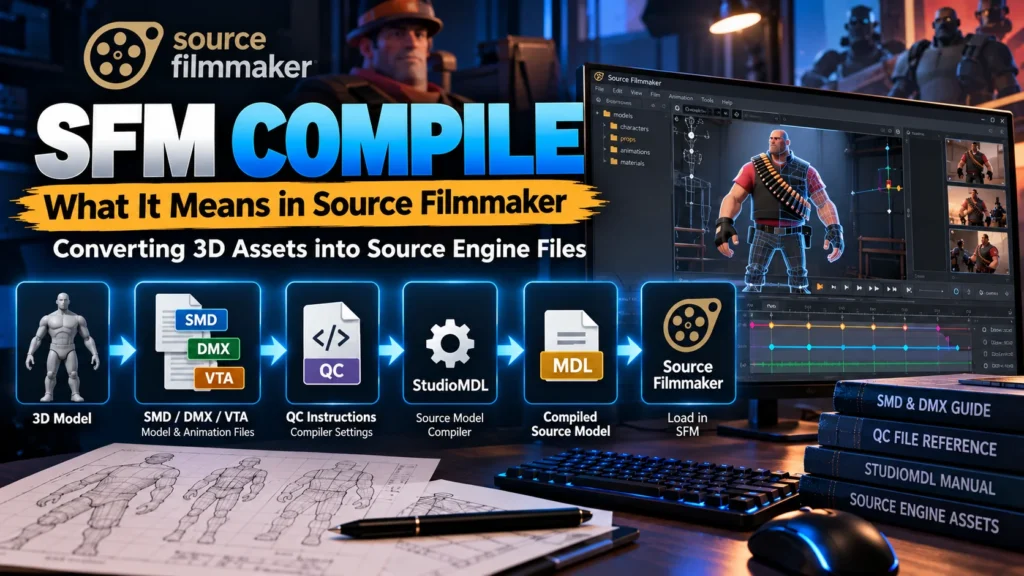
A typical custom-model workflow can look like this:
3D model → SMD/DMX/VTA → QC instructions → StudioMDL → compiled Source model → Source Filmmaker
The exact files depend on the type of asset being prepared. Valve’s documentation identifies StudioMDL as the Source model compiler used to convert intermediate model formats into the binary .mdl format read by the Source engine.
This means that compiling is not simply saving a model.
The compiler has to interpret information about the model’s geometry, skeleton, animations, materials, physics, and other settings. The QC file provides instructions that tell StudioMDL how the model should be built.
Once compilation succeeds, the resulting files can be placed in the appropriate Source game directories so that the model can be discovered and loaded by compatible tools.
Source Filmmaker and the Role of the Source Engine
Source Filmmaker, commonly shortened to SFM, is designed for creating animated movies, scenes, posters, and other forms of visual storytelling inside the Source environment.
The official Steam listing describes SFM as the movie-making tool used by Valve to make movies inside the Source game engine. It also explains that SFM uses the same assets as the associated game environment.
This architecture explains why asset preparation matters.
A normal 3D application and a game engine do not necessarily store or interpret assets in the same way. A modeling application may retain extensive editable information, while the engine needs data organized for runtime use.
The Source pipeline therefore separates source assets from compiled game content.
This distinction becomes especially important when working with custom characters, props, animations, or other imported resources.
The Main Files Used in an SFM Compile Workflow
Understanding the file types makes SFM compilation much easier to troubleshoot.
SMD Files
SMD is one of the traditional Source intermediate formats.
SMD files can contain model mesh information and can also be used for skeletal animation depending on how they are exported. Valve’s StudioMDL documentation lists SMD among the supported input formats.
An SMD-based workflow can therefore provide the compiler with information needed to build a Source-compatible model.
DMX Files
DMX is another Source-compatible format used in model and animation workflows.
Valve’s documentation lists DMX as an input format capable of carrying mesh, skeletal-animation, and vertex/flex-animation information.
The choice between SMD and DMX depends on the tools and workflow being used.
VTA Files
VTA is associated with vertex or flex animation.
It is useful when a model requires specific vertex-based facial or shape animation information. Valve’s StudioMDL documentation identifies VTA as an input format for vertex/flex animation.
QC Files
A QC file is one of the most important components of a traditional model compilation workflow.
Rather than being the model itself, the QC file acts as an instruction script for StudioMDL.
It can specify information such as:
- Model name
- Body groups
- Material locations
- Animation sequences
- Collision settings
- Skeleton-related information
- Model paths
- Other compiler directives
StudioMDL requires a QC file as its primary input parameter when compiling a model.
MDL Files
The .mdl file is the central compiled model file produced by StudioMDL.
Valve’s documentation describes MDL as containing information including the skeleton, animations, bounding and hit boxes, surface materials, LOD information, and other model data.
However, an MDL should not always be considered a completely self-contained model.
Other supporting files can be required for the model to function correctly.
VVD, VTX, and PHY Files
A compiled Source model can use several related files.
| File | General purpose |
| .mdl | Model structure and related model information |
| .vvd | Hardware-independent vertex information |
| .vtx | Optimized vertex/index data |
| .phy | Collision mesh information when physics data is included |
| .ani | Animation data in workflows that use external animation blocks |
Valve’s StudioMDL documentation lists these output files and explains their respective roles.
Knowing this is useful when a model appears incomplete after compilation. A missing supporting file can cause a problem even when the .mdl file itself exists.
The Basic SFM Compile Pipeline
A successful compilation generally depends on maintaining a consistent relationship between source files, QC instructions, materials, and output directories.
Prepare the Source Model
The first stage is preparing the 3D asset.
This could involve creating or editing a model in a compatible modeling application and then exporting it into a format supported by the Source pipeline.
The model should have an appropriate skeleton, valid geometry, properly assigned materials, and any required animation information.
Organize the Asset Files
File organization is more important than it initially appears.
Source expects assets to exist in recognizable directory structures. Valve’s Source SDK documentation distinguishes source model files from compiled model content and identifies separate locations for model source data, models, materials, and related files.
A messy directory structure can therefore create problems even when the model itself is technically correct.
Create or Configure the QC File
The QC file tells StudioMDL how to process the model.
This is where paths, model definitions, materials, animations, physics, and other compilation instructions are connected.
A typo in a QC path can result in an apparently mysterious error even though the actual problem is simply that the compiler cannot find the requested file.
Run StudioMDL
StudioMDL processes the QC file and generates the compiled model data.
Valve documents StudioMDL as a command-line tool and notes that the required argument is a path to a QC file.
The compiler output is extremely valuable for troubleshooting because warnings and errors often indicate exactly which part of the pipeline failed.
Move or Verify the Compiled Files
After compilation, verify that the expected model files exist in the correct directory.
A successful compiler message does not necessarily mean the model will look perfect inside SFM. Materials, textures, paths, skeletons, and animations still need to be checked.
Load the Model in SFM
The final practical test is loading the model in Source Filmmaker.
Check the model from several angles and test:
- Materials
- Textures
- Bones
- Facial controls
- Animations
- Physics where applicable
- Scale
- Orientation
- Visibility
- Performance
Testing the model before beginning a large animation project can save substantial time.
SFM Compile and the Difference Between Compiling and Rendering
One of the biggest sources of confusion around sfm compile is the difference between asset compilation and movie rendering.
They are related to the same creative workflow, but they are technically different operations.
Asset Compilation
Asset compilation converts source data into engine-compatible assets.
For example:
SMD/DMX + QC → StudioMDL → MDL and supporting files
This process is primarily concerned with getting a model or other Source asset into a usable engine format.
Movie Rendering
Rendering takes an already-built SFM scene and produces visual output.
Valve’s documentation describes SFM as capable of exporting movies and still images. Its documentation also explains that higher-resolution exports can require appropriate launch settings.
So:
Model compilation ≠ movie rendering
If someone says they need to compile an SFM, the first useful question is whether they mean:
- compiling a custom asset, or
- rendering/exporting a finished animation.
This distinction can prevent a lot of unnecessary troubleshooting.
Why a Custom Model May Not Appear Correctly
A model can technically compile while still producing problems when loaded.
Several different parts of the pipeline can be responsible.
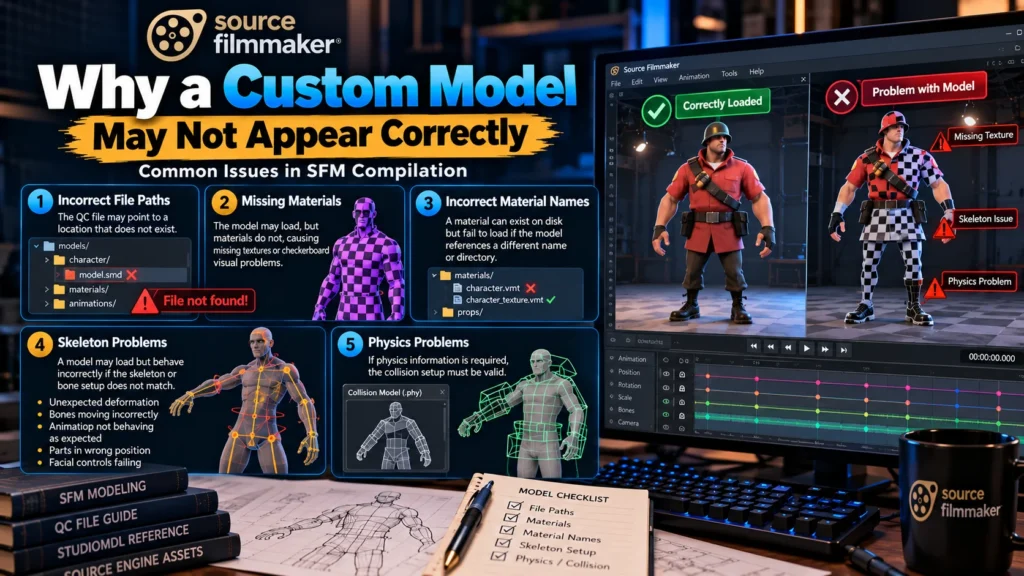
Incorrect File Paths
A path in the QC file may point to a location that does not exist.
This is one of the first things to inspect when StudioMDL reports that it cannot locate a model, material, or animation file.
Missing Materials
The model geometry may load correctly while its materials do not.
This can produce missing-texture or checkerboard-style visual problems.
The model compiler and material system are related but distinct parts of the Source content pipeline, so successful model compilation does not automatically guarantee that every texture is available.
Incorrect Material Names
A material can exist on disk but still fail to load if the model references a different material name or directory.
This is why material paths should be checked carefully.
Skeleton Problems
A model may load but behave incorrectly if its skeleton or bone setup does not match the intended animation system.
Symptoms can include:
- Unexpected deformation
- Bones moving incorrectly
- Animation not behaving as expected
- Parts of the model remaining in the wrong position
- Facial controls failing
Physics Problems
If physics information is required, the collision setup must also be valid.
Valve notes that a .phy output is produced when a collision model is defined.
A model can therefore look visually correct while still having an issue with collision-related data.
view more articles:
- Betterthisworld Money
- Nai Taiyari
- Shortminde com Review
- Vocalnewsmedia com Review
- Contact Gonzay com
- Glorvix com Review
- Adswynk com Review
- Is Crackstube Safe
- Dreamwithjeff com
- Betterthisworld Money
- Techyhittools org
- Lectfect com
- WebPayBlog Com
- Mercimek Kofte Near Me
Common SFM Compile Errors and Practical Checks
When an SFM compilation fails, randomly changing files is usually less effective than reading the compiler output.
Use a structured troubleshooting process.
Check the QC File First
Look for:
- Incorrect filenames
- Incorrect directories
- Missing quotation marks
- Incorrect model references
- Incorrect animation references
- Invalid compiler commands
- Material path mistakes
The QC file is the compiler’s instruction set, so an error there can affect the entire build.
Check Whether Source Files Exist
If the compiler says it cannot find a file, verify the exact filename and extension.
Windows paths can also become confusing when folders contain multiple similarly named files.
Check Material Directories
If the model compiles but textures fail, investigate the material paths separately.
Valve’s Source SDK directory documentation shows that model source content and compiled materials occupy different parts of the Source directory structure.
Read Warnings Instead of Ignoring Them
A compilation may complete even when warnings appear.
That does not necessarily mean the asset is perfect.
Warnings can reveal:
- Bone issues
- Material problems
- Animation inconsistencies
- Geometry concerns
- LOD-related issues
- Other structural problems
Valve’s StudioMDL documentation includes options for controlling warnings and reporting compilation status.
Crowbar and Graphical Compilation Workflows
Many SFM users prefer graphical tools instead of working entirely from the command line.
Valve’s developer documentation identifies Crowbar as a popular graphical frontend for StudioMDL and notes that it also supports other Source-model operations.
A graphical frontend can make compilation easier for users who are uncomfortable with command-line tools.
It can also make it easier to:
- Select a QC file
- Choose a game directory
- Start a compilation
- Review compiler output
- Decompile compatible Source models
- Repeat builds during testing
However, a graphical interface does not eliminate the underlying Source requirements.
If the QC file is incorrect, a GUI cannot automatically make the model pipeline valid.
SFM Compile for Game-Specific Assets
Searches such as fortnite sfm compile, sfm compile fortnite, marvel rivals sfm compile, sfm compile overwatch, and other game-specific phrases usually indicate interest in models, characters, animations, or scenes associated with a particular game.
The important technical point is that the original game’s assets and Source Filmmaker’s supported asset pipeline are not automatically interchangeable.
A game-specific model may involve:
- Different formats
- Different skeleton structures
- Different materials
- Different shaders
- Different copyright or licensing restrictions
- Different engine versions
- Different extraction or conversion requirements
A model from one game should therefore not be assumed to work in SFM simply because both involve 3D characters.
SFM Compile Character Searches and Search Intent
Searches containing character names can represent several different intentions.
For example, a user might search for:
- A character model
- A downloadable SFM asset
- A tutorial
- A rig
- A fan animation
- A compilation video
- A rendering guide
- A model-conversion workflow
Therefore, a keyword such as Tifa SFM compile, Lara Croft SFM compile, Mercy SFM compile, Harley Quinn SFM compile, Chun-Li SFM compile, Emma Frost SFM compile, or Widowmaker SFM compile does not automatically tell you what the user wants.
The surrounding search context matters.
For an educational article, the most useful interpretation is generally the technical SFM workflow: how compatible models are prepared, compiled, organized, and loaded.
Understanding SFM Compile Club and SFMCompileClub Searches
The phrases sfm compile club and sfmcompileclub represent a different type of search intent from the technical term SFM compile.
This distinction matters because similarly named third-party sites or communities are not automatically official Source Filmmaker tools.
Valve’s official documentation identifies Source Filmmaker and its Source development tools, including StudioMDL. It does not identify a separate official Valve product called SFM Compile Club.
When a search result uses a similar name, check:
- The exact domain
- The site’s stated purpose
- Whether it is affiliated with Valve
- What type of content it publishes
- Its privacy and security practices
- Whether downloads are trustworthy
- Whether the content is appropriate for your intended use
A similar name should never be treated as proof of official affiliation.
SFM Compile and Community Content
Source Filmmaker has a long history of user-generated content.
Valve’s documentation describes the SFM Workshop ecosystem, including the ability to subscribe to and work with Workshop assets.
This community-driven model is one reason why searches around specific characters and games can produce large numbers of results.
However, community content can vary substantially in:
- Quality
- Documentation
- Compatibility
- Maintenance
- Licensing
- File organization
- Safety
- Technical accuracy
Before adding an unfamiliar asset to a production project, inspect the source and verify that the asset is compatible with your version of SFM.
Improving the Quality of an SFM Compile
A reliable compilation workflow is not only about making the model appear.
The goal is to create an asset that remains stable during actual animation work.
Use Consistent Naming
Keep model, material, animation, and QC filenames organized.
Consistent naming makes troubleshooting easier when a project contains dozens or hundreds of assets.
Keep Source and Output Files Separate
Maintain a clean distinction between editable source files and compiled game content.
This makes it easier to modify the original model and rebuild it later.
Test Before Animating
Do not wait until a large scene is complete before checking the model.
Open a test session and verify the asset first.
Check Multiple Poses
A model can appear correct in its default pose but deform incorrectly during animation.
Test a reasonable range of movement before using the model extensively.
Verify Materials Under Different Lighting
Some material problems become visible only when lighting changes.
Test the model under different scene conditions rather than checking it from a single camera angle.
Keep Backups
Save working versions of:
- Source models
- QC files
- Material files
- Animation files
- Compiled outputs
- SFM sessions
This makes recovery much easier when an experimental change introduces a new problem.
Rendering Considerations After the Compile
Once the asset is successfully compiled and working inside SFM, the next stage may be rendering.
This is separate from model compilation.
Valve’s documentation states that SFM’s default movie rendering resolution is 720p and provides instructions for enabling higher output resolutions through launch options.
Higher-resolution rendering can take longer, and Valve specifically warns that changing resolution settings can affect viewport performance.
For that reason, a practical production workflow is:
- Compile and test the model.
- Build the scene.
- Animate the scene.
- Preview at a manageable resolution.
- Fix camera, lighting, materials, and animation.
- Save the final session.
- Perform the final high-quality export.
This separates technical asset problems from rendering problems.
A Practical SFM Compile Checklist
Before considering a custom model ready for production, review the following checklist:
- Confirm the correct Source Filmmaker version.
- Confirm that the model is intended for the appropriate Source pipeline.
- Prepare the source mesh correctly.
- Verify the skeleton and bone structure.
- Export the necessary source files.
- Create or verify the QC file.
- Check every referenced path.
- Confirm material names.
- Confirm material directories.
- Compile through StudioMDL or an appropriate frontend.
- Read compiler warnings.
- Verify the generated MDL.
- Check supporting VTX and VVD files.
- Check PHY data when physics are required.
- Load the model into SFM.
- Inspect textures.
- Test bones and controls.
- Test animations.
- Test facial or flex controls where applicable.
- Test the model from multiple camera angles.
- Save a clean working copy before starting the final animation.
Key SFM Compile Terms to Remember
For beginners, the terminology can seem complicated, but the basic relationships are straightforward.
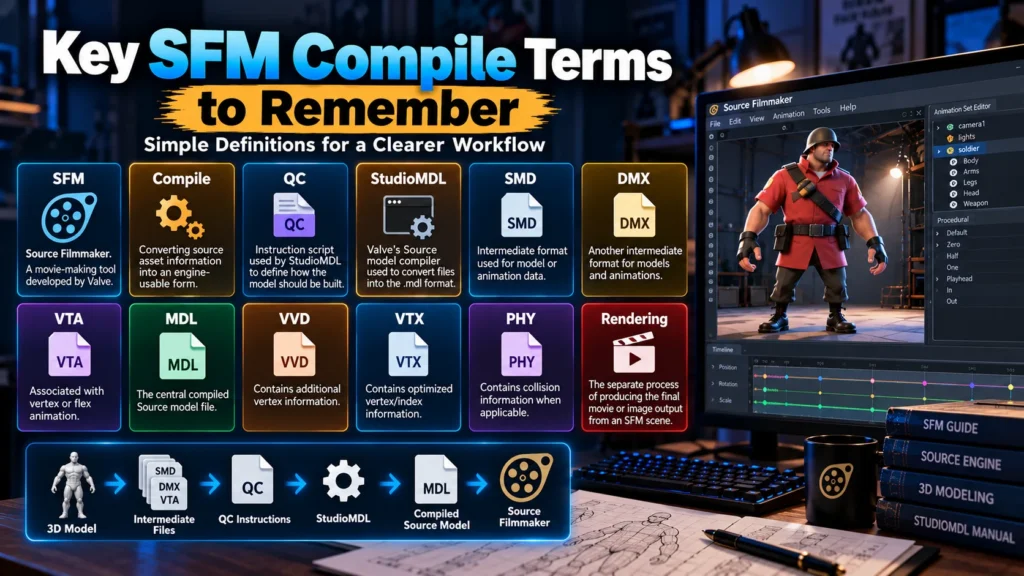
SFM means Source Filmmaker.
Compile means converting source asset information into an engine-usable form.
QC means the instruction script used by StudioMDL.
StudioMDL is Valve’s Source model compiler.
SMD and DMX can be used as intermediate model or animation formats.
VTA is associated with vertex or flex animation.
MDL is the central compiled Source model file.
VVD contains additional vertex information.
VTX contains optimized vertex/index information.
PHY contains collision information when applicable.
Rendering is the separate process of producing the final movie or image output from an SFM scene.
Keeping these definitions separate makes the entire workflow easier to understand.
Important Search-Intent Differences Around SFM Compile
The search landscape around sfm compile is broader than one technical definition.
A useful way to organize the related searches is:
| Search type | Likely intent |
| sfm compile | General technical information |
| compile sfm | General SFM compilation workflow |
| sfmcompileclub | Third-party/community search |
| sfm compile club | Community or website-related search |
| fortnite sfm compile | Game-specific SFM content |
| sfm compile fortnite | Fortnite-related SFM search |
| marvel rivals sfm compile | Character/game-related SFM search |
| sfm compile overwatch | Overwatch-related SFM search |
| sfm compile genshin | Genshin-related SFM search |
| reddit sfm compile | Community discussions and user experiences |
| sfm compile sound | Audio or SFM production-related search |
| sfm compile page | Website/page navigation intent |
| Character-specific SFM searches | Model, animation, tutorial, or media intent |
This is why simply repeating the exact keyword throughout an article would produce a poor user experience. The better approach is to cover the underlying topics naturally and explain the terminology users are actually searching for.
How to Research SFM Compile Information Safely
Because third-party websites can use similar names, research should start with authoritative technical material whenever possible.
The Valve Developer Community provides technical documentation for Source tools, including StudioMDL and Source Filmmaker.
The official Steam listing provides information about SFM’s developer, purpose, distribution, and general functionality.
Third-party guides can be useful for understanding community workflows, but technical claims should be checked against primary documentation when the distinction matters.
A strong research process therefore looks like:
Official documentation → technical verification → community examples → practical testing
rather than relying on a single third-party article.
Conclusion
SFM compile is primarily a technical term connected to the Source Filmmaker asset pipeline. For custom models, it describes the process of taking source information such as SMD, DMX, VTA, and QC instructions and processing it through Source tools such as StudioMDL to create engine-compatible model files. Valve’s documentation confirms StudioMDL’s role as the Source model compiler and documents the input and output formats involved.
At the same time, the search phrase has developed broader meanings online. Some users are looking for model compilation, while others are searching for SFM animation compilations, character-specific assets, game-related content, community discussions, or similarly named third-party websites. Understanding that search-intent difference is essential when researching terms such as sfm compile club, sfmcompileclub, fortnite sfm compile, marvel rivals sfm compile, overwatch sfm compile, and other related searches.
For creators, the most reliable workflow is to keep source files organized, maintain accurate QC instructions, use the appropriate compiler, read compiler warnings, verify materials and supporting files, and test the finished asset inside SFM before beginning a large project. Separating asset compilation from final rendering also makes troubleshooting much easier.
Ultimately, learning the SFM compile pipeline gives creators better control over custom models and other Source assets while reducing the confusion that often comes from missing files, incorrect paths, broken materials, or incompatible content.
What is SFM compile?
SFM compile generally refers to preparing Source Filmmaker assets so they can be used by the Source engine. For custom models, this commonly involves source files, a QC script, and StudioMDL, which produces a compiled MDL model and supporting files.
Is SFM compile the same as rendering a video?
No. Model compilation prepares assets for the Source engine, while rendering or exporting produces the final movie or image from an SFM scene. Valve documents SFM as a movie-making and export tool, while StudioMDL handles Source model compilation.
Is SFM Compile Club an official Valve tool?
Valve’s official technical documentation identifies Source Filmmaker and tools such as StudioMDL, but it does not identify a separate official Valve product called SFM Compile Club. Similar third-party names should therefore be evaluated independently.
Does SFM support custom content?
Yes. Source Filmmaker supports custom and Workshop-based content, and Valve’s documentation includes dedicated Workshop material for working with SFM assets.
What is the difference between SMD and DMX?
Both can serve as intermediate formats in the Source model pipeline. Valve’s StudioMDL documentation lists SMD and DMX among supported inputs for mesh and animation workflows.
Can an SFM compile contain animation data?
Yes. Source model compilation can incorporate skeletal and vertex/flex animation data through supported formats and QC instructions. StudioMDL’s documented input formats include SMD, DMX, and VTA for different animation purposes.
Does a higher-resolution SFM render take longer?
Generally, yes. Valve’s documentation specifically notes that higher-resolution rendering takes longer than the default 720p rendering, particularly on older or lower-end hardware.